



Does your Network affect sound quality?
“Ethernet is just 1s and 0s. How could a network switch or filter possibly improve Audio quality?”
“Sounds like boutique networking gear for people trying to optimise what doesn’t need optimising.”
“If this made a measurable difference to data integrity, hyperscale data centres would be installing them by the rack.”
These are fair questions, and ones we’ve heard a lot since launching our SmoothLAN network products. Most of our work deals with vibration, but noise reaching a streamer and DAC through the network connection is the same problem in a different form. So we’re going to tackle the most common objections head-on, with the technical reasoning behind each answer.
Some of the scepticism is valid. But as we’ll explain, streaming high-resolution audio is a fundamentally different challenge from serving web traffic, and what doesn’t matter in a data centre can matter in your listening room.
Why data centre logic doesn’t transfer to Hi-Fi
“If it made a difference, data centres would already be using it.”
In large-scale commercial environments, the only thing that matters is whether packets arrive intact. Phase noise, timing variation, and electrical interference are completely irrelevant when you’re running spreadsheets or serving websites; the system simply doesn’t care how the bits arrive.
But this logic doesn’t transfer to Hi-Fi. A streamer and DAC aren’t just moving data; they’re converting it into an analogue audio signal, and that conversion is sensitive to electrical noise in a way a web server never is.
Ethernet is never silent
“Ethernet is sent in short bursts – surely it’s not a continuous signal?”
This is a common misconception. While audio data is transmitted in packets, the physical Ethernet connection between your switch and streamer is always active. Even during network “silence,” the link continuously transmits idle signalling to keep the connection alive and synchronised.
This idle signalling isn’t quiet. Ethernet’s line encoding is designed to keep the signal DC-balanced; the transformers that couple each end of the link can’t pass DC, so the link maintains constant voltage transitions even when no data is flowing. The result is a continuous stream of high-frequency switching activity, regardless of whether any audio is being streamed.
That switching activity generates electrical noise. And that noise can propagate into your streamer and DAC.
From electrical noise to timing error
“How does this noise affect audio quality?”
Every bit transition on an Ethernet link, from 1 to 0 or vice versa, is subject to slight timing variations, known as jitter, introduced by the transmitting device. Separately, the Ethernet receiver must remain continuously active to catch every packet without loss, meaning its circuitry is always working, and always generating noise, whether music is playing or not.
This matters because jitter and electrical noise can infiltrate the sensitive clocking and analogue stages of a streamer and DAC, even before any audio conversion takes place. The problem isn’t data corruption; it’s timing corruption.
The limits of internal re-clocking
“My DAC already has internal re-clocking. Doesn’t that solve it?”
Re-clocking is a valuable technology, and most modern DACs and streamers include it. But there’s a design limitation that’s rarely discussed: the re-clocking circuitry typically shares a common ground plane with the Ethernet interface.
Here’s why that’s a problem. Ethernet interfaces are inherently noisy, generating interference through switching regulators, common-mode currents, and magnetic leakage. This noise doesn’t stay contained within the Ethernet circuitry. It travels through the shared ground plane, reaching the re-clocking components before they’ve had a chance to do their job.
Once digital noise has contaminated the ground plane, it’s extremely difficult to remove. Re-clocking depends on a stable, low-noise electrical environment to function accurately, and re-clocking that operates in an already-noisy environment starts from a compromised foundation. The result can be degraded clock precision, which may manifest as blurred transients, reduced spatial accuracy, and a loss of low-level musical detail.
Bit-perfect isn’t the whole picture
Yes, TCP (Transmission Control Protocol) ensures every audio packet arrives intact and in the correct order. The digital audio data itself is not corrupted or lost. Bit-perfect transmission is guaranteed.
But TCP protects the data. It does not protect the electrical environment through which the data travels.
Even with perfect packets, the Ethernet signal carries high-frequency electrical noise from switching regulators, magnetic components, and common-mode currents. This noise can:
- Couple into the DAC’s power or ground planes
- Affect internal clocks and analogue stages
- Introduce jitter that internal re-clocking can’t fully correct, particularly if that re-clocking circuitry is already operating in a noisy environment
External network regeneration addresses this at the source. By cleaning, isolating, and re-clocking the signal before it reaches the DAC, it gives the downstream circuitry a cleaner electrical foundation to work from, supporting clock stability and, with it, the subtler qualities of timing, transient response, and spatial detail in the audio.
Why deliberately limit to 100Mbps?
“A slower connection can’t be better. Why would I want to drop from a Gig to 100Mbps?”
It sounds backwards, but the 100Mbps limit is a deliberate design decision shared by both the SmoothLAN Filter and the Regenerator, and it comes down to filtering.
A gigabit link operates across a much wider frequency spectrum than a 100Mbps link. Filtering inside the frequency range the data occupies isn’t feasible; it would distort the signal and cause errors, so the wider the data spectrum, the less room there is to filter noise without touching the data itself. Constraining the link to 100Mbps narrows the signal band, allowing far more aggressive filtering of everything above it while leaving the data untouched.
Bandwidth isn’t the sacrifice it appears to be. 100Mbps carries the highest-resolution audio formats with substantial headroom; even uncompressed 24-bit/192kHz stereo needs under a tenth of it. And nothing about your network changes: connect either SmoothLAN device to a gigabit network and the link auto-negotiates to 100Mbps for that final connection only, while the rest of your network runs at full speed.
Passive filtering vs active regeneration
Not all network solutions work the same way, and the right one depends on the system.
Passive solutions, such as Stack Audio’s SmoothLAN Filter, use independent isolation stages, filtering, and galvanic isolation to reduce noise and break ground loops between network equipment and the streamer. This is a genuine improvement in many systems; noise reduction at the final link is exactly where it counts. What a passive approach doesn’t do is correct timing errors: whatever jitter passes through the filter remains in the signal, at a reduced noise level.
Active solutions, such as the SmoothLAN Regenerator, go further. Rather than filtering the incoming signal, they reconstruct it entirely using a local, ultra-low-noise clock reference, discarding accumulated jitter rather than reducing it. The output isn’t a cleaned-up version of a noisy signal; it’s a freshly generated one.
In systems where noise is the dominant issue, passive filtering addresses it directly. In systems sharing network infrastructure with routers, NAS drives, or other electrically active devices, where accumulated jitter becomes a factor alongside noise, active regeneration addresses both at once.
What reviewers and customers found
The reasoning above is one thing; what people report hearing is another. We can’t tell you the two will line up in your system, but here is what independent reviewers and customers have said about the SmoothLAN Regenerator.
Sceptics are well represented among them. One customer, Michael S. (USA), bought it as his first network filter: “I really did not know what to expect… I was a little shocked to be honest.” Another, Richard N. (UK), ran the comparison that matters most for streaming: “With the introduction of the LAN Regenerator, I honestly could not differentiate between local CD and the streamed version.”
Among reviewers, The Ear described it as “a well-executed and nicely finished active network filter,” and An Aussie Audiophile went further on value: “I don’t think anything else on the market can beat this in terms of price-to-performance.” fairaudio also addressed the Filter/Regenerator question directly, describing the Regenerator as clearly two steps up from the passive SmoothLAN.
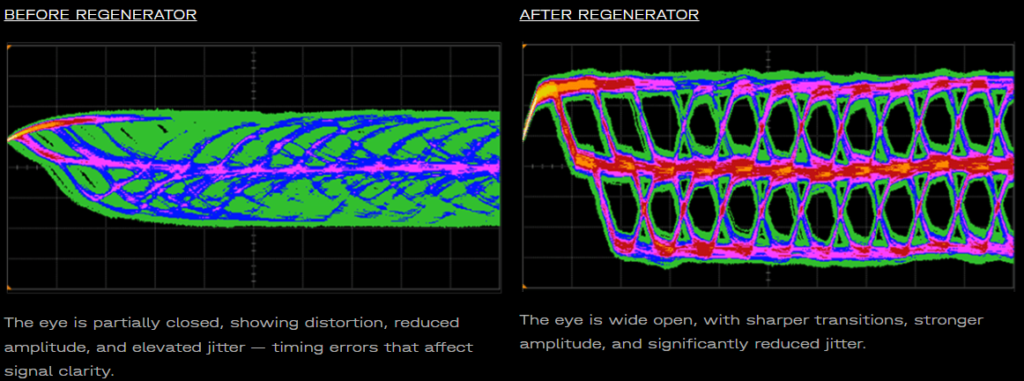
The mechanism is measurable, too. We captured the Ethernet signal before and after regeneration at the end of a 20-metre cable, from a standard FTTH router, using a Tektronix differential probe. The eye pattern opens visibly after regeneration: sharper transitions, stronger amplitude, and significantly reduced jitter.
The Bottom Line
The scepticism around audiophile networking gear is understandable, particularly from those with a background in data engineering or IT. When your frame of reference is data integrity, the idea that network hardware could affect sound quality seems implausible, and in a purely data-centric context, it is.
But audio performance isn’t just about data integrity. It’s about electrical cleanliness and timing precision. A DAC isn’t a web server; it’s converting digital signals into an analogue waveform, and the electrical environment it operates in affects how well it can do that. Noise and jitter that are completely inconsequential in a data centre become relevant the moment a system is sensitive enough to be affected by them.
Standard networking equipment isn’t designed with any of this in mind. It’s optimised for throughput and reliability, not for the low-noise, low-jitter environment that high-resolution audio demands. That’s the gap that purpose-built audio network equipment is designed to fill, and why the difference is most apparent in systems that are already resolving enough to reveal it.
If you’d rather test it against your own ears than take our word for it, that’s what the 60 days are for. You’ll hear a difference, or your money back.

 EN
EN  DE
DE  NL
NL  FR
FR  JA
JA  PT
PT  ES
ES  SV
SV  IT
IT  FI
FI